
Warehouse operations, actually built for the warehouse floor.
Bin-level tracking, scan-driven pick, pack, receive, and dispatch workflows. Multi-warehouse coordination in real-time. Purpose-built for growing operations — not adapted from accounting software.
 ⤢
⤢
What Warehouse Operations handles.
Everything the warehouse floor needs to run in real-time — from goods receipt to dispatch, across single or multiple warehouses.
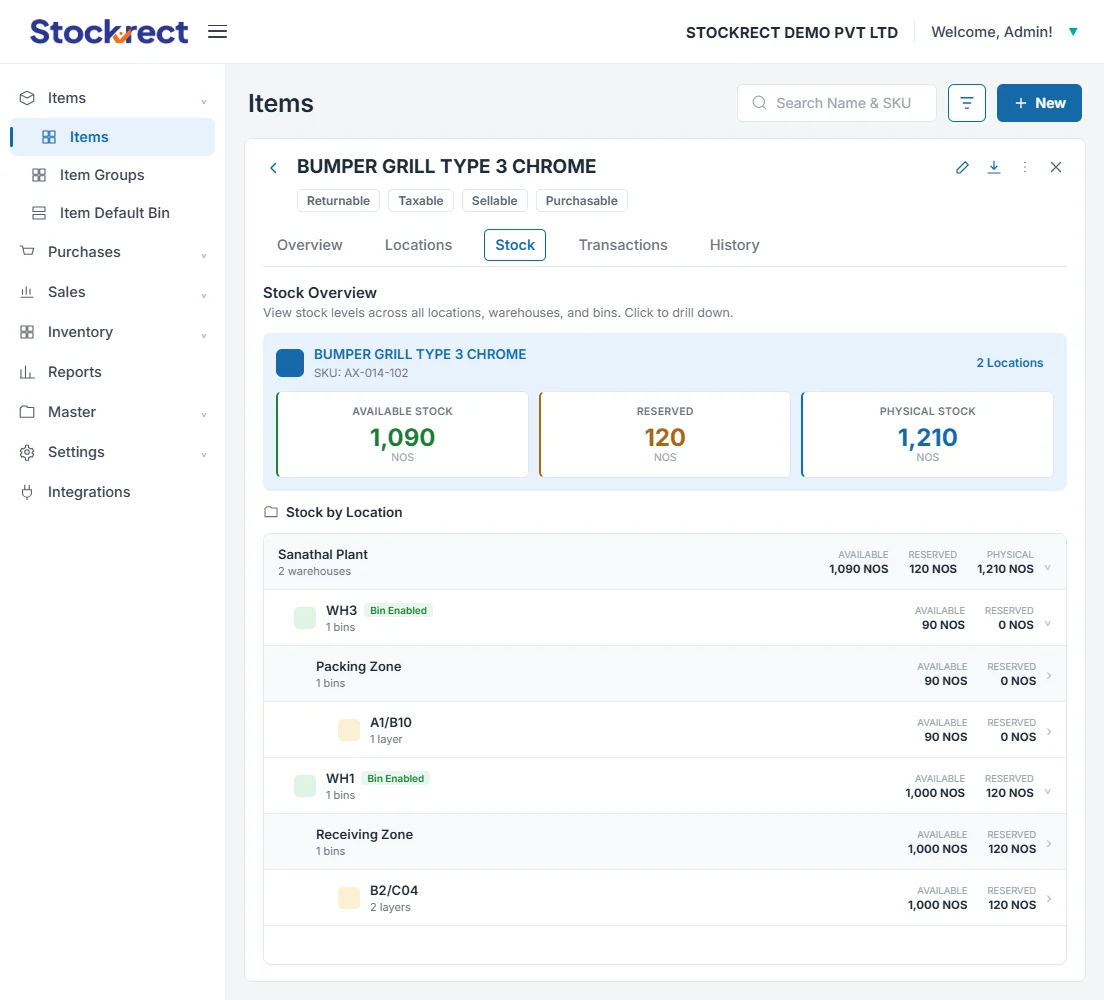
Bin-Level Inventory Tracking
Track stock at bin, rack, and location granularity. Not just 'warehouse level' — actual physical location within each warehouse.
Pick & Pack Workflows
Scan-driven pick lists optimized for warehouse layout. Pack validation against sales orders. Real-time inventory decrements.
Goods Receipt (GRN)
Scan-validated goods receipt against POs. 3-way match preparation. Rejection handling for over-shipments, under-shipments, damaged goods.
Dispatch Coordination
Dispatch workflow from packed orders to shipment. Handoff to shipping providers. Automatic compliance document generation.
Multi-Warehouse Coordination
Real-time inventory across every warehouse. Transfer workflows with proper controls. Warehouse-specific configurations for different operational patterns.
Cycle Counting
Structured cycle count workflows. Discrepancy handling. Variance reporting with root cause categorization.
Stock Adjustments
Adjustment workflows for damaged goods, obsolescence, corrections. Every adjustment auditable with user attribution and reason codes.
Real-Time Visibility
Management, warehouse heads, and sales all see current stock levels — no overnight batch, no reconciliation waits.
How teams actually use it.
Five workflows that make up daily warehouse operations. Every workflow starts on mobile (Android or iOS) with scan validation at every step.
Goods Receipt (GRN)
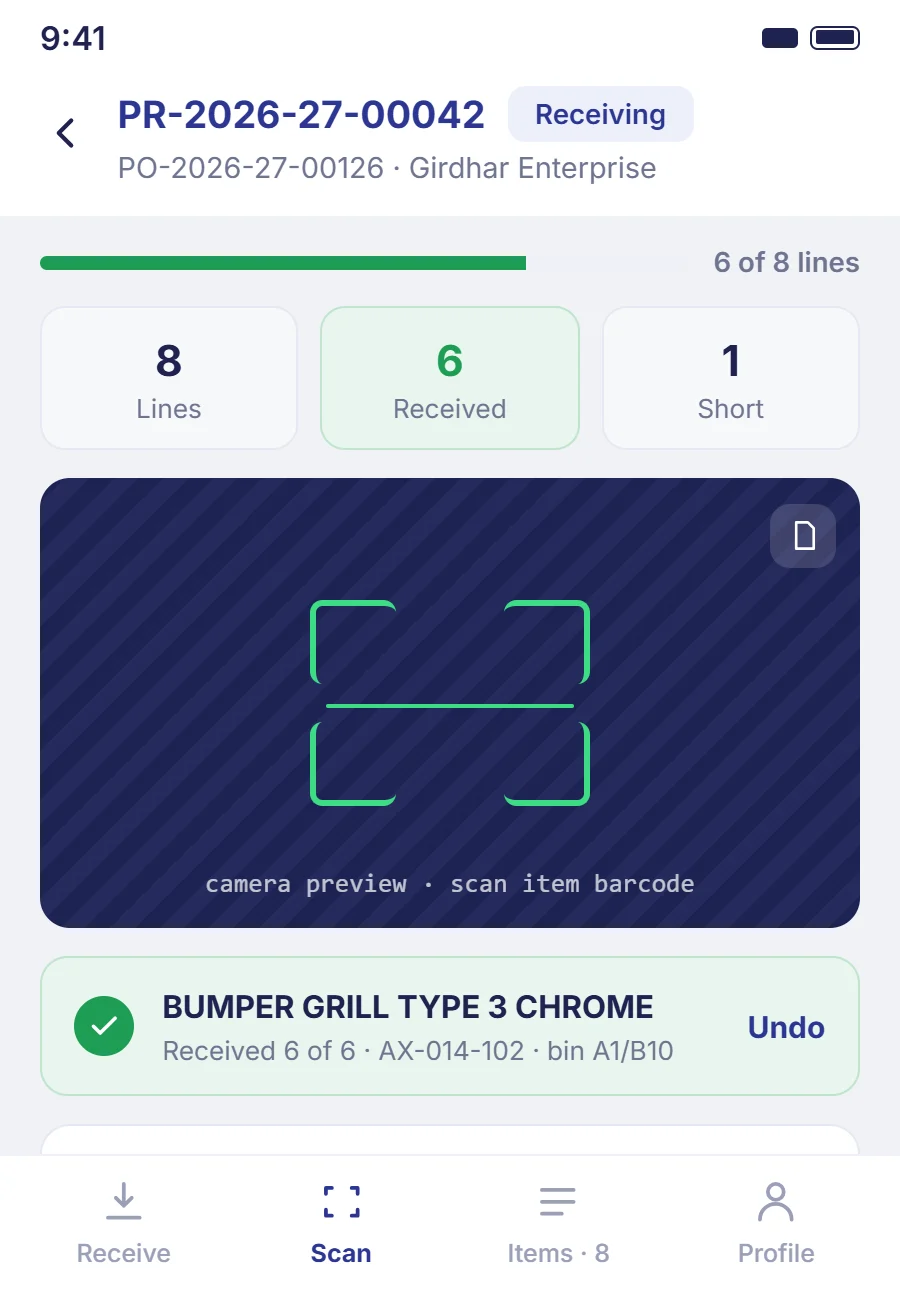
Goods arrive at the warehouse. Warehouse operator opens the mobile app, scans the PO reference. System pulls up expected items and quantities. Operator scans each incoming item — system validates against PO, flags variances immediately. Once complete, GRN is submitted; system updates inventory in real-time and triggers 3-way match preparation.
- Operator scans PO reference on mobile
- System displays expected items and quantities
- Operator scans each incoming item
- System validates and flags variances (over/under/damaged)
- Operator submits GRN
- Inventory updated in real-time
- 3-way match preparation triggered automatically
Pick & Pack
Sales order confirmed. Pick task automatically generated with items grouped by bin location for warehouse-optimized picking. Operator scans pick task on mobile, walks the warehouse floor scanning each item as picked. System validates against pick list in real-time. Completed picks route to packing station. Packer validates against sales order, generates packing slip, marks ready for dispatch.
- Sales order confirmed by system or team
- Pick task auto-generated with bin-optimized routing
- Operator scans pick task on mobile
- Operator picks each item, scanning to validate
- System validates against pick list in real-time
- Picked items route to packing station
- Packer validates against sales order and generates packing slip
- Marked ready for dispatch
Dispatch
Packed orders queue for dispatch. Dispatch coordinator reviews queue, confirms shipment groupings, generates dispatch documents. System triggers the Tax Compliance module to generate compliant invoices and jurisdictional documents (e-invoicing, e-way bills for India). Shipping provider handoff completes the workflow.
- Packed orders queue for dispatch
- Dispatch coordinator reviews and groups shipments
- Dispatch documents generated
- Tax Compliance module triggers compliant invoicing
- Jurisdictional documents generated (India: e-invoicing, e-way bills)
- Shipping provider handoff
- Dispatch confirmed, inventory decrement finalized
Multi-Warehouse Transfer
Transfer request initiated (from Warehouse A to Warehouse B) — either by low-stock rule or manual coordination. System reserves inventory at source, creates transfer document. Source warehouse operator picks and packs the transfer using the standard pick workflow. Marked as 'in transit.' Destination warehouse operator receives the shipment using the goods receipt workflow, validates against the transfer document. Inventory position updates: decremented at source, incremented at destination — both changes visible in real-time.
- Transfer request initiated (rule-based or manual)
- Inventory reserved at source warehouse
- Transfer document generated
- Source warehouse: pick and pack workflow
- Shipment marked 'in transit'
- Destination warehouse: goods receipt workflow
- Validation against transfer document
- Real-time inventory update at both locations
Cycle Counting
Cycle count schedule defined per warehouse configuration (rotating count of a subset of bins on a defined cadence). Assigned count tasks appear on the operator's mobile. Operator scans bin location, scans each item, enters counted quantity. System compares to expected quantity, flags discrepancies. Discrepancies routed to warehouse head for review. Approved adjustments update inventory with full audit trail (user, timestamp, reason).
- Cycle count schedule defined per warehouse config
- Count tasks assigned to operators via mobile
- Operator scans bin location and items
- System compares counted vs. expected quantities
- Discrepancies flagged for warehouse head review
- Approved adjustments update inventory
- Full audit trail preserved (user, timestamp, reason)
Different roles. Different views.
Warehouse Operations serves five roles across the organization — each with their own view, workflows, and dashboards.
Warehouse Operators / Pickers
Mobile app on the warehouse floor. Scan-driven pick, pack, receive, cycle count workflows. Task assignment and completion. Real-time inventory queries.
See this role →Warehouse Heads
Desktop dashboard for warehouse-level metrics. Team task assignment. Discrepancy review and approval. Warehouse-specific configuration.
See this role →Operations Managers
Multi-warehouse coordination view. Transfer initiation. Cross-warehouse inventory decisions. Operational reporting.
See this role →Sales Teams
Real-time stock availability queries — from mobile or desktop — before committing to customer orders. Reservation and allocation workflows.
See this role →Management / Executives
Executive dashboards with warehouse KPIs. Real-time visibility without waiting for reports. Alerts for exception thresholds.
See this role →How it connects.
Sales & Orders
Sales orders trigger pick tasks. Real-time stock availability visible to the sales team before committing orders.
Procurement
POs from Procurement trigger goods receipt workflows in Warehouse Operations. GRN completion feeds 3-way match preparation.
Tax Compliance
Dispatch triggers compliant invoice generation via the Tax Compliance module. Jurisdictional documents (e-invoicing, e-way bills for India) generated automatically.
Mobile App
All warehouse floor workflows execute on the Mobile App. Scan-driven with real-time sync when connected.
Reports & Analytics
Warehouse metrics feed real-time dashboards. Standard warehouse reports include pick velocity, receipt turnaround, cycle count variance, inventory accuracy.
Shipping Providers
Standard integrations to major shipping providers for dispatch handoff. Custom integrations available for regional or specialized carriers.
Accounting Systems
Dispatch and GRN events feed accounting via the Integrations module. Reconciliation preparation automatic.
Custom Integrations
API access for custom warehouse integrations — RFID systems, automated conveyors, warehouse management hardware. Contact us for evaluation of specific integration needs.
Common questions.
Depends on your tier. Starter is single-warehouse. Growth handles up to 3. Business handles up to 5. Enterprise is unlimited. Tier upgrades happen without platform migration — no rip-and-replace when you grow.
Not today. Native Android and iOS apps require connectivity for real-time sync and validation. Offline mode is on our roadmap. For warehouses with consistently poor connectivity, we'd recommend addressing connectivity first (site survey, mesh Wi-Fi) or waiting for offline mode delivery.
Standard Android and iOS devices. Most modern smartphones and tablets work well. For specific ruggedized device evaluations (Zebra, Honeywell, etc.), contact us — we haven't tested every ruggedized device in the market and want to verify compatibility before committing.
Camera-based scanning of barcodes and QR codes using the mobile device. No additional hardware needed for standard operations. Validates in real-time against expected items — variances flagged immediately for the operator to resolve or escalate.
Standard workflows cover most B2B distribution and manufacturing operations. Custom configuration is available for warehouse-specific patterns (rack numbering conventions, pick methodologies, cycle count cadence). Deep custom development is available on Business and Enterprise tiers.
Bin optimization can prioritize high-velocity SKUs in accessible locations. Cycle count cadence can be higher for high-velocity SKUs and lower for slow-movers. Standard reports identify velocity patterns for informed layout decisions.
Cloud-native architecture with high availability. Historical uptime targets meet SLA commitments. In rare downtime scenarios, warehouse operations pause — this is the trade-off with real-time architecture. Offline mode (on roadmap) will address this.
Cycle counting produces variance reports. Inventory accuracy dashboards track running accuracy percentage. Discrepancy patterns are visible for root cause analysis (specific bins, specific SKU categories, specific operators).
See warehouse operations working in a real environment.
A 30-minute discovery call. We'll understand your warehouse operation, show you the specific workflows that address your situation, and be honest about whether Stockrect is the right fit.
Real customer running Warehouse Operations: 90,000+ SKUs across 10 warehouses, 100+ users on the platform daily.